TUNE YOUR GRAPHIC CARD
Direct3D Users: If you are running Windows Me/98/95 and have a Direct3D card or MMX enhanced processor in your system, you can use the Viscape Direct3D driver to display smooth-shaded objects in your worlds.
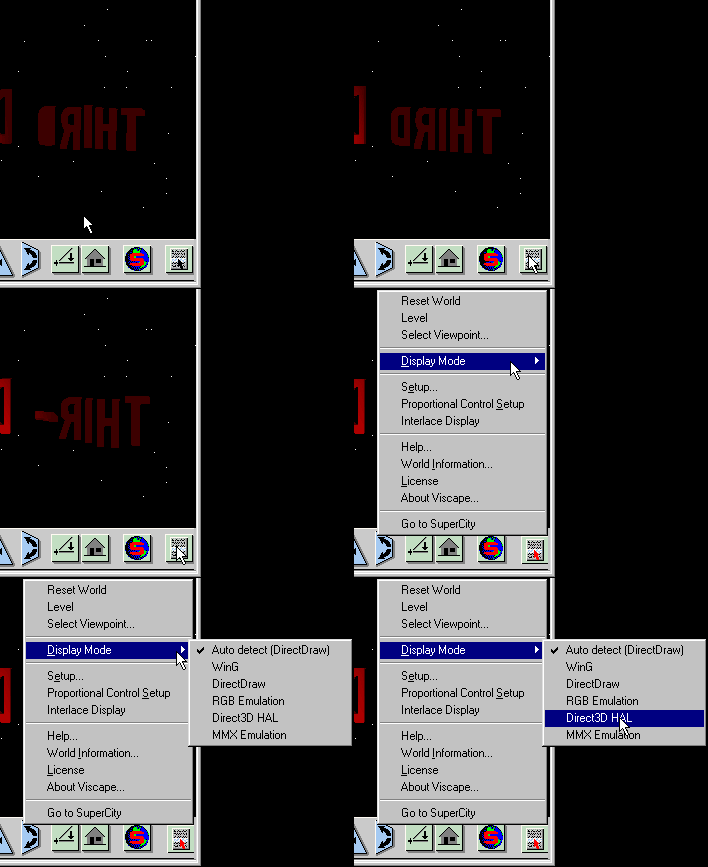
The effect varies from graphics card to graphics card, so some experimentation may be necessary to find the option that provides optimum performance. This can be done quickly and easily via the following steps (as illustrated in the image below) :
- - On the Viscape Toolbar, click on the bottom right hand icon to bring up the menu.
- - Select Display Mode.
- - Click on an option.
- AutoDetect gives the best compatibility (suggested under Windows XP). Use it if some graphics are missing.
- Direct 3D Hal mode can provide the best performance but doesn't work on some ATI graphic cards.